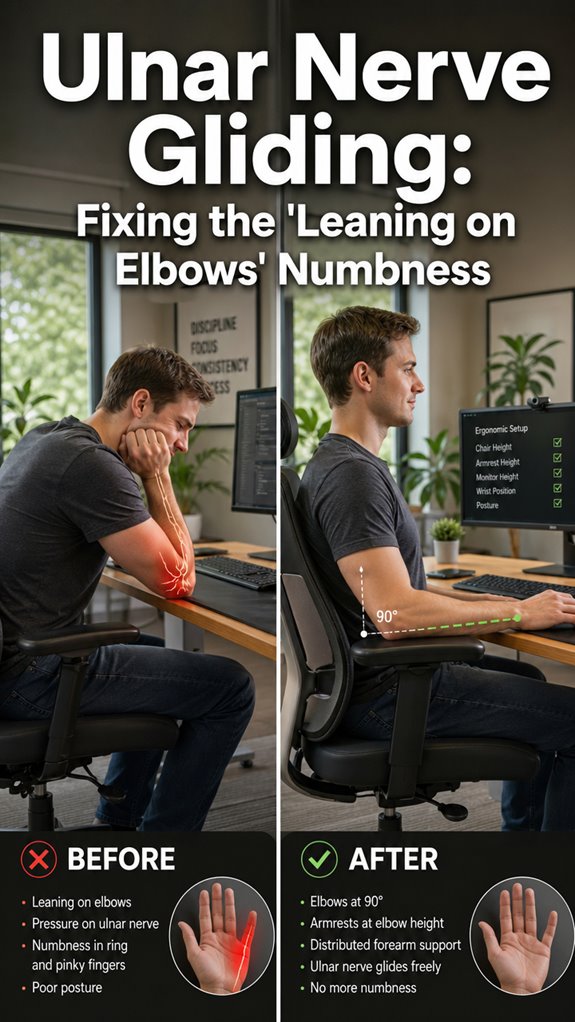
Tired of my elbows screaming after standup? I stopped treating my body like legacy code nobody maintains.
Learned this the hard way. Two winters ago, my left elbow locked up mid-sprint. Felt like someone injected sand into the joint. Doc said olecranon bursitis from six years of grinding my elbow into particleboard while debugging. Classic “I’ll fix it later” energy. I kept a Whole Foods bag of frozen corn on my desk for weeks. Peak aesthetics.
Now? Chair hugs my spine like a good code review. Monitor raised to eye level so I’m not turtle-necking into infinity. Keyboard close enough that my shoulders don’t hitch toward my ears. Micro-adjustments, baby. My body isn’t a machine I can patch indefinitely.
Think your weird desk posture isn’t adding up? It is. Every single day.
—
Why Your Desk Setup Is Causing Chronic Elbow Bursitis
Here is my nightmare fuel.
March 2022. Launch week. I’m living at my IKEA desk, elbow drilling into the edge while I chase a memory leak. By Thursday, my elbow looked like I hid a golf ball under the skin. Red. Shiny. Terrifying. Couldn’t fully extend my arm. Missed the release party. Got cortisone instead.
The kicker? My “ergonomic” mouse pad had a gel wrist rest that pushed my forearm angle all wrong. Wrong tool, wrong outcome. Coupled with repetitive strain injury patterns and poor circulation from static positioning, my joint cavity filled with fluid like a corrupted buffer overflow.
Now I evangelize standing desk converters and hourly movement alarms to every junior dev I mentor.
Quick Takeaways
- Adjust your monitor to eye level to avoid leaning forward and reduce shoulder and neck strain.
- Maintain proper chair height, ensuring feet are flat and knees are level to support neutral posture.
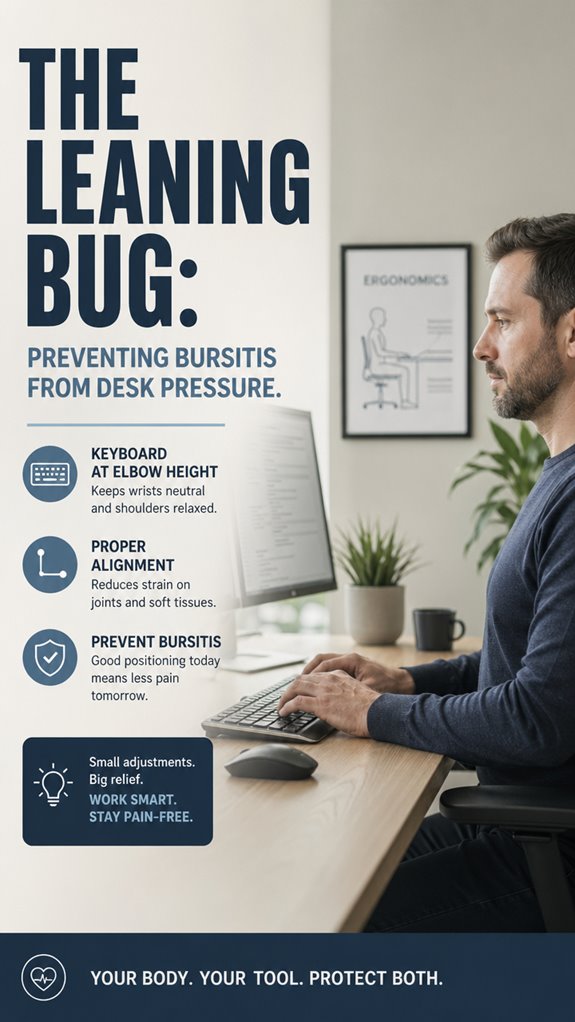
- Keep keyboards and mice close to your body to minimize reaching and elbow pressure.
- Take regular breaks to shift positions and prevent prolonged static pressure on elbows and shoulders.
- Use ergonomic cushions and supports to distribute pressure evenly and reduce joint inflammation risk.
How Does Poor Desk Posture Lead to Bursitis?
When working as a senior developer amidst the chaos of constant code commits and relentless bug reports, it’s easy to overlook how your biomechanical infrastructure suffers from repeated desk pressure, akin to a memory leak draining system resources.
Poor posture forces elbows and shoulders into suboptimal states, elevating inflammation levels — much like a software system’s cache becomes corrupted from inefficient data flow. This micro-level failure, compounded over hours, triggers pain and restricted range of motion, degrading operational capacity. Additionally, using electric air dusters can help maintain a clean workstation, further supporting ergonomic practices.
Just as a buggy kernel destabilizes a once-pure environment, neglecting ergonomic fundamentals causes hardware-like inflammation, silently degrading your productivity and version control over your own body. Incorporating easy plant tips into your workspace can also promote a more refreshing atmosphere, contributing to your overall well-being.
Signs of Desk-Related Bursitis You Should Watch For
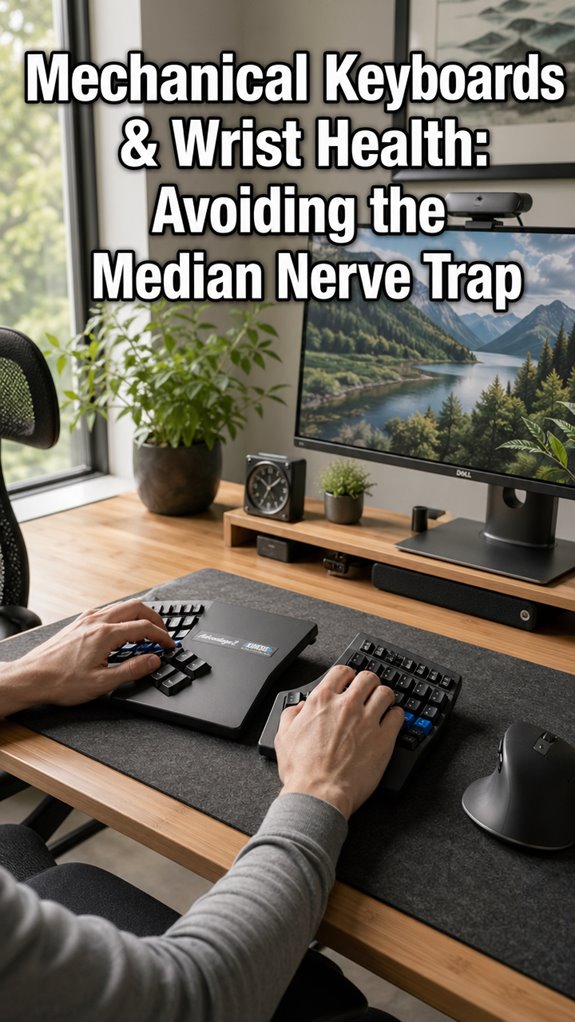
Detecting early signals of desk-related bursitis is akin to debugging a stubborn memory leak—subtle, yet catastrophic if ignored. Identify persistent discomfort, swelling, or tenderness near elbows or shoulders, which quietly escalate. Incorporating split mechanical keyboards can help improve typing posture and reduce strain.
| Symptom | Location | Associated Behavior |
|---|---|---|
| Pain | Elbow, shoulder | Extensive wrist support use, prolonged leaning |
| Swelling | Bursae vicinity | Repetitive typing, poor posture seem unrelated but aren’t |
| Limited mobility | Joints | Work stress signals system overload |
| Tenderness | Soft tissue area | Artificial improvements fail to resolve |
| Discomfort at rest | During mobile working hours | Ignored, until system shutdown is inevitable |
Simple Ergonomic Tips to Prevent Bursitis at Your Desk
Like debugging a pervasive memory leak in a legacy system, ergonomic mastery begins with macro-system protocols—office lighting and keyboard ergonomics—computationally akin to optimizing system calls. Insufficient lighting corrupts cognitive circuits, while poor keyboard positioning triggers cascading micro-failures down to joint level.
Achieve vector alignment by calibrating light sources to prevent eye strain, and implement ergonomic keyboard setups—split, adjustable, with tenting options—like code refactoring for clarity. Keep in mind, in this cybernetic ecosystem, neglecting these foundational protocols is equivalent to running kernel panic loops, risking systemic inflammation.
Incorporating monitor stands can further enhance your workspace ergonomics and support optimal posture.
Strike a balance, because, much like Ghost in the Shell, if the infrastructure fails, so does the entire operation.
Proper Sitting Posture for Shoulder and Elbow Relief

In the grand architecture of your workspace—akin to a poorly optimized network—poor sitting posture acts as that relentless memory leak, slowly degrading system performance and triggering hardware-like failures in your joints.
- Make certain your desk height is calibrated for a neutral joint position, avoiding the CPU overload of reaching or slouching. Scented candles can enhance the ambiance, creating a more inviting workspace that promotes relaxation and focus.
- Align your monitor at eye level, eliminating the erroneous “forward lean” bug that corrupts data flow to your shoulders and elbows.
- Keep keyboard and mouse within close proximity, minimizing unnecessary API calls—i.e., arm extension—preventing API timeouts like bursitis.
- Regularly run posture “debugging” protocols, taking breaks or adjusting ergonomics before system crashes—like a well-oiled codebase, your body needs updates. Additionally, consider integrating CO2 monitors into your workspace to ensure optimal air quality, which can enhance overall comfort and focus.
When to See a Healthcare Professional for Bursitis
When joint inflammation begins to cascade through your hardware, it signals that the system’s error logs have become too verbose for your current patchwork of ergonomic patches. Your desk pressure-induced bursitis acts as a rogue plugin, corrupting critical functions. Investing in top smart watches can help you stay mindful of your posture and overall health, potentially reducing the risk of such complications. If pain persists beyond standard bursitis treatment protocols—say, over two days of relentless debugging—it’s time for a system reboot. Ignoring these errors risks a full system crash—like muscle degeneration or joint dysfunction. Additionally, exploring options like caffeine gum can provide a temporary energy boost to help manage discomfort while you seek proper treatment.
Choosing Ergonomic Office Cushions
Selecting the most effective ergonomic office cushion resembles debugging a critical memory leak—each option a patch, yet absent diagnostics only exacerbates system failures.
Consider:
- Office cushion types: gel, foam, or memory foam—each with distinct data footprints, optimized for stability. High-quality air ionizers can help improve the overall indoor environment.
- Ergonomic design: contoured shapes that redistribute load, akin to reallocating processing threads, minimizing pressure on vulnerable bursae.
- Material durability: look for breathable covers—ensuring system ventilation, preventing overheating, and mitigating performance degradation.
- Compatibility: ensuring seamless integration with your existing hardware, like fitting a laptop stand that doesn’t cause further system conflicts.
When evaluating your options, prioritize top donut cushions known for their comfort and support, as they can significantly enhance your seating experience.
In essence, choose wisely—Ghost in the Shell might see this as a perfect metaphor.
Posture Misalignment Issues

Despite your best efforts to implement ergonomic control modules, the system inevitably crashes due to faulty posture algorithms—specifically, forward head positioning turning the cervical spine into a poorly optimized data conduit.
This flaw propagates macro failures in neck alignment and shoulder positioning, akin to software bugs in a poorly coded kernel.
| Aspect | Faulty State | Corrective Action |
|---|---|---|
| Neck alignment | Head juts forward, strain | Maintain head flush, cite “Wall Test” |
| Shoulder positioning | Hunching, elevation | Keep shoulders low, relax |
| Elbow angle | Above 90°, overtaxes muscles | Adjust to 90° for forearms |
| Chest muscles | Tight, rotate shoulders forward | Stretch and strengthen |
| Spinal posture | Over-curved back, discs compressed | Shift positions regularly |
Just like System.out.println(), better to debug our own human infrastructure before a total system collapse. Incorporating best supplements for enhancing focus can provide additional support in maintaining concentration during long hours at the desk.
Ergonomic Chair Adjustments
In the grand debugging of our ergonomic infrastructure, the chair serves as the cornerstone of systemic stability—yet all too often, it’s configured as the most overlooked bug in the chain.
- Adjust seat height: aim for thighs parallel to the floor, ensuring core stability without activation of compromised bursae. Incorporating proper pelvic alignment during this adjustment can also alleviate pain associated with prolonged sitting.
- Optimize backrest angle: lock in a position that minimizes office lighting glare and mitigates forward lean—because no amount of keyboard ergonomics can compensate for a faulty foundation.
- Fine-tune lumbar support: provide a rigid, predictable support structure that prevents unnecessary joint stress, reminiscent of patching a memory leak before it corrupts the entire system.
- Reconfigure armrests: set to support elbows without exerting pressure—think of it as coding a precise function call, not forcing a function into an infinite loop.
Additionally, incorporating regular breaks during intense coding sessions can significantly help in managing fatigue and enhancing overall productivity.
Proper Keyboard Placement Techniques
When your ergonomic chair buddies up with an optimized workspace but your keyboard remains a stubborn relic of the early 2000s, system failures cascade—lost productivity, bursitis, the ghost in your shell. Proper keyboard placement techniques optimize keyboard alignment and wrist positioning, functioning as essential firmware updates.
By aligning your keys with your forearms’ natural angle, you prevent micro-crashes in your joint infrastructure. Elevate and tilt your wrist to avoid buffer overflows—think of it as debugging your own hardware to prevent physical memory leaks. Maintaining boosted focus through ergonomic practices can significantly enhance your overall programming efficiency, as an optimized workspace can lead to better performance and reduced fatigue.
If your system’s crashing daily, recognize the importance of this micro-optimization; even “Ghost in the Shell” would endorse a hardware refresh.
FAQ
Can Bumper Pads or Cushions Effectively Prevent Elbow Bursitis at Work?
Bumper pads or cushions can effectively prevent elbow bursitis by improving keyboard posture and monitor height, reducing pressure on elbows. Use ergonomic pads to maintain proper positioning, limit leaning, and guarantee your workspace minimizes joint stress and discomfort.
What Exercises Best Support Shoulder and Elbow Joint Health for Office Workers?
You should prioritize posture correction exercises, like shoulder rolls and wall angels, to boost shoulder mobility and reduce bursitis risk. Power up your joints with strength training, maintain consistency, and stay mindful of ergonomic habits daily.
Are There Specific Ergonomic Tools Recommended for Reducing Desk Pressure?
You should use an ergonomic keyboard and wrist support to slash desk pressure. These tools empower you to maintain proper posture, reduce strain, and enhance productivity, giving you the confidence to work comfortably and prevent bursitis effectively.
How Long Should I Rest After Experiencing Bursitis Symptoms Before Returning to Work?
Rest at least a few days, but only return when symptoms fade completely, and you’re confident daily activities won’t trigger discomfort. Monitor symptoms closely—resuming too soon risks lasting damage, and control reigns only with patience and vigilance.
Can Frequent Breaks Alone Completely Prevent Bursitis From Desk Pressure?
Frequent breaks alone can’t fully prevent bursitis; you must combine them with posture correction and ergonomic adjustments. Stay vigilant, maintain proper support, and shift positions actively—this powerful approach guarantees lasting prevention from desk pressure injuries.
Summary
Ultimately, ignoring ergonomic updates amidst the chaos of prolonged typing sessions is akin to releasing a patch for a legacy bug without addressing the root code—just a fleeting fix in a collapsing system. As in “Ghost In The Shell,” where failure to optimize the nexus leads to systemic corruption, neglecting posture and chair calibration risks a cascade of bursitis errors—a crash your body likely can’t debug alone. So, before your shoulder crashes like a deprecated API, optimize your environment; your downtime depends on it.
References
- https://my.clevelandclinic.org/health/diseases/10918-bursitis
- https://www.mayoclinic.org/diseases-conditions/bursitis/symptoms-causes/syc-20353242
- https://www.goodrx.com/health-topic/joints/bursitis-causes-symptoms-treatment
- https://sunnyvaleorthopedics.com/what-causes-bursitis-to-flare-up/
- https://www.nhs.uk/conditions/bursitis/
- https://www.brownhealth.org/be-well/what-bursitis-and-how-it-treated
- https://newsinhealth.nih.gov/2019/06/beating-bursitis
- https://www.healthpartners.com/blog/bursitis-symptoms-and-treatment/
- https://www.bswhealth.com/blog/hip-pain-hip-bursitis-exercises-to-try-at-home
- https://www.houstonmethodist.org/blog/articles/2020/nov/3-at-home-work-desk-mistakes-that-can-lead-to-bad-posture-and-muscle-pain/
- https://foothillsrehab.com/blog/posture-practices-sitting-at-desk/
- https://wildernessfamilychiropractic.com/top-solutions-for-desk-job-posture-issues-2/
- https://www.michaelmoodyfitness.com/personaltrainersfitnessanddietblog/why-your-office-desk-is-destroying-your-posture-and-what-you-need-to-do
- https://www.mayoclinic.org/healthy-lifestyle/adult-health/in-depth/office-ergonomics/art-20046169
- https://spinehealth.org/article/spine-posture-workplace-ergonomics/
- https://www.belldistrictspineandrehab.com/how-to-improve-posture-at-desk/
- https://www.posturite.co.uk/blog/common-desk-posture-mistakes-how-to-fix