Ever wonder why my back feels like it’s running legacy code from 1995? Because I treated standing desks like set-and-forget cron jobs.
I learned this the hard way. Six hours locked in position, convinced I was “optimizing.” Then my shoulders started screaming. Turns out, static standing is just sitting’s evil twin.
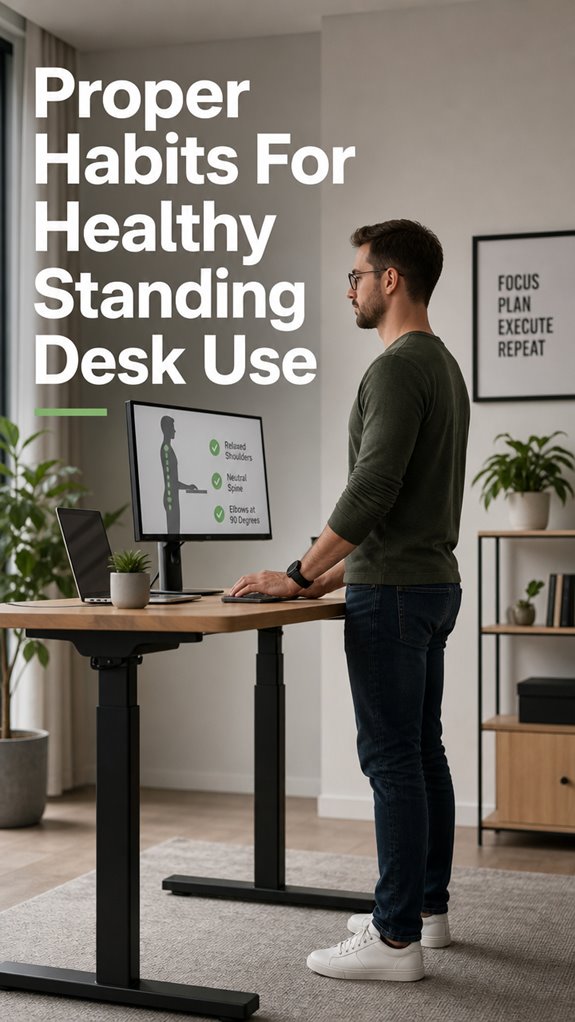
Now? I move. Shifting weight. Micro-breaks. My monitor sits at eye level, elbows hit that sweet 90 degrees. Feet planted like proper root access.
Your body isn’t hardware you can deprecate. It sends real-time alerts. Listen before the logs fill with pain.
Movement isn’t distraction. It’s the patch that keeps the whole system from crashing.
Standing Desk Back Pain: Why My “Perfect Setup” Still Failed
I thought I’d cracked it. Expensive mat. Ergonomic everything. Yet by Wednesday, my lower back was staging a full revolt.
The culprit? I never actually stood *differently*. Same posture. Same pressure points. Just vertical.
Physical therapist called it “enforced stillness.” Recommended calf raises, occasional hip shifts, even walking meetings. Sounded like agile for my spine. Reluctantly, I tried.
Difference was immediate. Blood flow returned. That afternoon slump vanished.
Turns out circulation, fascia health, and dynamic movement matter more than any single purchase. Your standing desk is only as good as your willingness to actually use your body.
Quick Takeaways
- Adjust the desk and monitor height to maintain neutral spine alignment and prevent neck and back strain.
- Shift weight evenly across both feet and avoid locking knees during prolonged standing.
- Take regular micro-movements or short breaks to promote circulation and reduce muscle fatigue.
- Use supportive accessories like anti-fatigue mats and footrests to enhance comfort and stability.
- Maintain good posture with relaxed shoulders and elbows at 90 degrees, and avoid leaning forward.
How to Set Up Your Standing Desk for Proper Ergonomics
If you’ve ever deployed a stubborn bug without properly debugging your environment, you’ll recognize the importance of getting your infrastructure right from the start—because a misconfigured standing desk is fundamentally like a memory leak that silently degrades performance.
Set your desk at elbow height, approximately 44 inches for most, ensuring your code—sorry, your arms—aren’t in perpetual limbo.
Your monitor should be aligned at or slightly below eye level, akin to the “Ghost in the Shell” aesthetic—strictly optimized for clarity, avoiding visual artifacts.
Supporting accessories act as your debugging tools: final validation that your system won’t crash under pressure, maintaining that elusive balance between function and form. Incorporating top grip trainers can also enhance your hand strength, which is crucial for efficient typing and sustained productivity at your standing desk.
Building Habits for Good Standing Posture
Building habits for good standing posture mirrors debugging a sprawling codebase; neglect one module—say, your core—and the entire system destabilizes.
Your structural integrity, like a flaky API, depends on disciplined calibration of foundational elements.
You must consistently enforce spinal alignment protocols, ensuring your vertebral hierarchy isn’t compromised by deviation. Shoulders relaxed, neutral spine, elbows at 90 degrees—think of it as maintaining clean code—no dangling variables here.
Micro-adjustments matter: a slight wrist tilt, a subtle foot shift—these are your code commits, refining your implementation.
Like “Ghost in The Shell,” your posture must be a seamless, integrated system—otherwise, bullshit bugs cascade into chronic pain. To enhance this, consider incorporating elbow pads for comfort as part of your ergonomic setup to support your arms during extended periods of standing.
Easy Movement Tips to Prevent Strain at Your Standing Desk
When your standing desk setup resembles a patched-together alpha build, the first bug manifests as muscular strain—akin to a memory leak metastasizing in your core subsystem—triggering awkward compensations.
To patch this, implement:
- Micro-movements—engage in systematic limb updates every 10-15 minutes, akin to auto-restarts, to prevent systemic bottlenecks.
- Dynamic repositioning—shift your monitor height and foot position like refactoring code, avoiding a ‘locked knees’ bug.
- Intermittent walking—light jogs or leg stretches, similar to sector cleanups in system maintenance, sustain circulation.
Incorporating vertical mice into your setup can also enhance comfort and reduce strain during extended use.
This routine enforces real-time patches for your human infrastructure, mirroring Ghost in the Shell’s cybernetic resilience.
Common Standing Desk Problems and How to Fix Them
In the grand architecture of your standing desk setup, the most glaring bugs manifest as ergonomic anomalies that can sabotage even the most rigorously maintained micro-movements—think of them as memory leaks in your biomechanics, slowly accumulating and corrupting your posture data over time.
Errors often stem from misaligned monitors, locked knees, or inconsistent movement patterns—latent bugs that manifest as chronic strain. Address these with a structured diagnostic table:
| Issue | Cause | Solution |
|---|---|---|
| Monitor too low/high | Incorrect desk height | Adjust desk or monitor |
| Locked knees | Failure to micro-move | Incorporate micro-breaks |
| Poor footwear | Insufficient support | Wear supportive shoes |
Without iterative testing, you’re just patching symptoms, not debugging the root cause—reminiscent of “Ghost in the Shell” trying to function with corrupt code. Incorporating standing desk calorie calculations can help you monitor your activity levels and adjust your habits for optimal health.
My First Ergonomic Footrest
If you’ve ever attempted to run a debug session on a malfunctioning codebase, you’ll recognize the chaos when core hardware or ergonomic protocols falter. Enter my first ergonomic footrest—a patch in the OS of my posture management system.
Its three core functions are:
- Stabilizing system calls—redistributing weight evenly to prevent one-leg-only kernel crashes.
- Buffering input/output—allowing my lower back’s lumbar process to buffer unnecessary strain.
- Calibrating foot-level APIs—elevating the base layer, akin to upgrading a firmware component, to prevent lockups like a suspiciously malfunctioning shell.
In addition, surrounding my workspace with top indoor plants provides a serene environment that promotes focus and reduces stress.
Because even the most sophisticated software demands a reliable infrastructure—otherwise, it’s just Ghost in the Shell, running on vapor.
Unsteady Core Causes Imbalance
Core stability functions as the backbone of your ergonomic architecture, yet it often operates behind a faulty API—manifested as unsteady engagement that cascades into systemic imbalance.
Like a bug in your code, weak core muscles misfire, forcing your posture to execute corrective routines that increase static load and fatigue. Envision your spine as the kernel module, constantly crashed by improper input—poor foundation, memory leaks of disuse, and bad data flow from neglect.
When the core’s not on the latest build, micro-adjustments cause more wobble than a race condition. The result? An endless cycle of “reboot and retry,” but your physical infrastructure is in perpetual debug mode.
Adjust Monitor Height Regularly

When your monitor’s height remains static like a deprecated API endpoint, it’s metaphorically akin to running outdated firmware on critical hardware—inefficient, glitch-prone, and risking systemic core failures.
You must periodically recalibrate, or risk a ripple effect from neck strain, impaired focus, and compromised visual clarity.
- Verify eye level by comparing the monitor’s top edge to your gaze axis—think of it as a version check.
- Incrementally adjust the height using modular stands or adjustable arms—like patching a bug.
- Test for micro-movements ensuring fluid, dynamic alignment—akin to refactoring code for optimal performance.
Additionally, incorporating tools like massage balls can enhance muscle relaxation during breaks, promoting better overall posture.
Failure to do so is the digital equivalent of a kernel panic—you can’t afford the crash.
Correct Sitting Posture Tips
In the grand architecture of your ergonomic scenery, posture acts as the foundational bug in the system that, if unpatched, causes cascading failures—like the infamous backlog of unresolved merge conflicts.
As a senior dev, you know the importance of debugging code before deploying, yet neglect your skeletal kernel and UAT—upper torso alignment and wrist ergonomics—can crash your productivity faster than a failed patch.
Keep shoulders relaxed, spine with hierarchical integrity, and elbows at 90 degrees—the buffer that prevents hardware depletion. By incorporating full-body posture into your workflow, you can enhance both comfort and efficiency in your coding sessions.
Remember: Ghosts in the shell thrive on neglecting baseline protocols, risking systemic cascade failures.
FAQ
How Long Should I Stand Before Taking a Break?
You should stand for about 30 to 60 minutes before taking a break. Mix sitting and standing, alternate positions regularly, and move around or stretch to prevent fatigue, promoting healthy circulation and reducing strain.
What Is the Ideal Height for My Standing Desk?
You should set your standing desk to elbow height, usually around 44 inches for someone 5’11”. This position allows your elbows to bend at 90 degrees, keeping your arms comfortable and minimizing strain while working.
How Can I Build a Consistent Standing Desk Routine?
Like a steady navigator steering your ship, build a standing desk routine by setting timers, gradually increasing standing time, and tracking your progress. Take control, stay consistent, and adapt your habits to maintain balance and prevent fatigue.
Are Standing Desks Suitable for People With Back Pain?
Standing desks can help with back pain if you maintain proper posture, adjust desk height correctly, and incorporate movement and breaks. You stay in control by actively listening to your body and avoiding prolonged static positions.
What Are Signs I Need to Adjust My Posture?
Like a knight sensing danger, you notice neck strain, shoulder tension, or persistent discomfort—these signs mean you need to adjust your posture. Pay attention to alignment, and actively correct your positioning to stay comfortable and injury-free.
References
- https://fluidstance.com/blogs/news/standing-desk-posture
- https://www.orthocarolina.com/blog/7-of-your-most-burning-questions-about-standing-desks-answered-by-a-physical-therapist
- https://loctekmotion.com/blogs/Ergonomic-Design/A-Guide-to-Maintaining-Health-with-Standing-Desks
- https://www.imovr.com/blogs/future-of-work/the-ultimate-guide-to-standing-desk-ergonomics
- https://www.healthline.com/nutrition/6-tips-for-using-a-standing-desk
- https://www.uclahealth.org/safety/ergonomics/office-ergonomics/sitting-standing-workstations
- https://www.youtube.com/watch?v=A2LX-b7a6a0
- https://www.softstarshoes.com/live-bare-blog/stand-up-for-your-health-4-tips-you-should-know-about-standing-desks/
- https://www.fezibo.com/blogs/news/top-7-causes-of-standing-desk-wobble-and-how-to-fix-them
- https://www.youtube.com/watch?v=Opp2gkoAsRk
- https://flexispot.co.uk/blog/tired-of-a-shaky-standing-desk-make-it-stable-today
- https://eurekaergonomic.com/blogs/eureka-ergonomic-blog/diagnose-fix-wobbly-standing-desk
- https://www.progressivedesk.ca/blogs/top-tips/proper-standing-desk-posture-top-5-mistakes-to-avoid
- https://www.btod.com/blog/why-standing-desks-wobble/
- https://friskadesk.com/blogs/standing-desk-advice/standing-desk-wobble
- https://www.trainerroad.com/forum/t/staying-active-with-a-standing-desk/75351
- https://vvenace.com/blogs/news/is-your-standing-desk-wobbling-a-step-by-step-guide-to-diagnosing-and-fixing-the-problem